
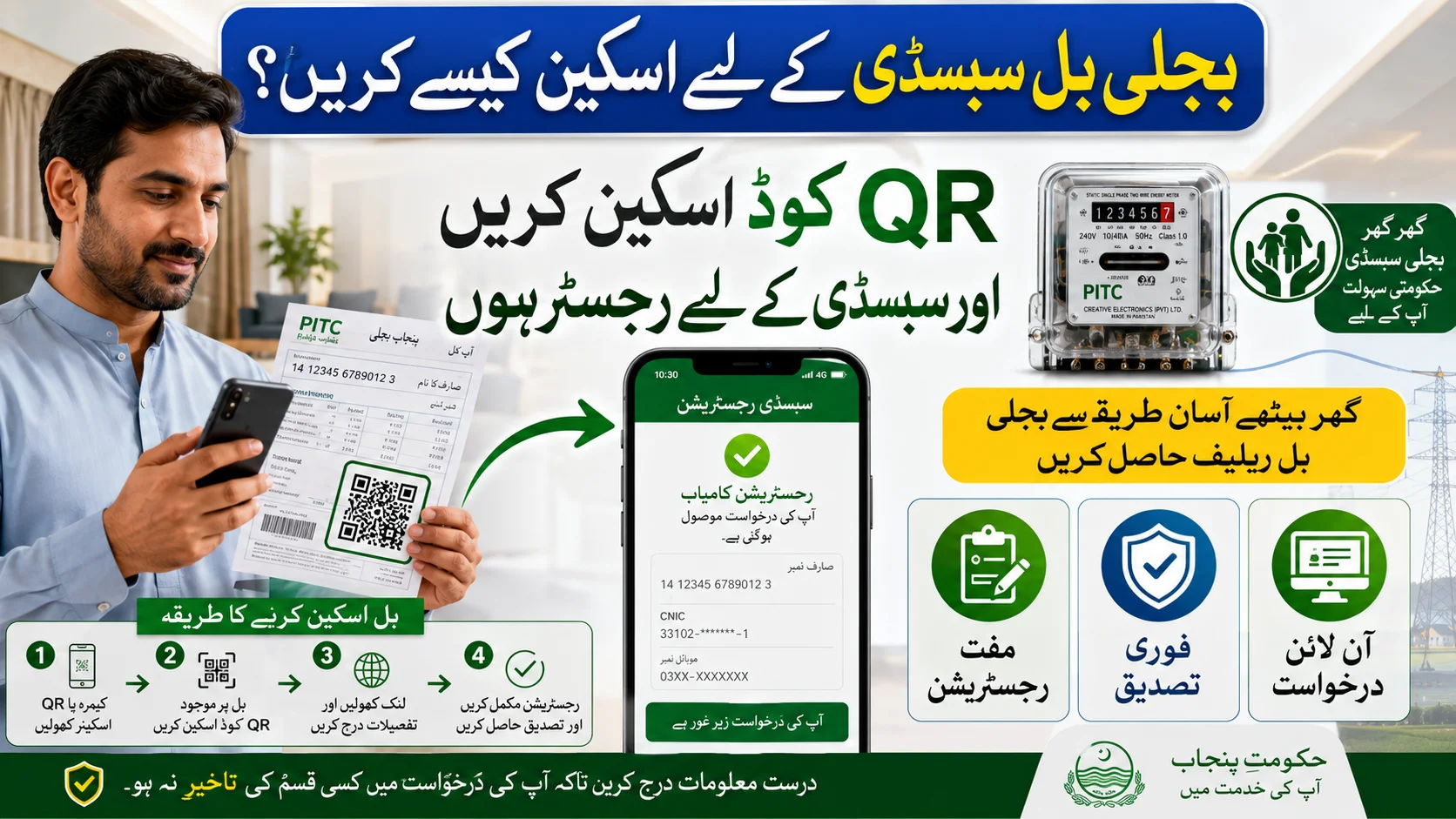
Many electricity consumers are hearing about subsidy programs and electricity bill relief schemes, but one question keeps coming up: How do you scan an electricity bill for subsidy registration?
If you’ve recently seen a QR code printed on your electricity bill and weren’t sure what to do with it, you’re not alone. A few weeks ago, I helped a family member apply for an electricity subsidy program, and the most confusing part was simply understanding how to scan the bill correctly. The process turned out to be much easier than expected.
In this guide, I’ll explain how to scan your electricity bill for subsidy registration, what information you need, common mistakes to avoid, and what happens after scanning the bill.
Why Electricity Bill Scanning Is Important
Many electricity relief and subsidy programs now use QR codes and digital verification systems to make registration easier.
Instead of manually entering long reference numbers or visiting offices, consumers can simply scan the code printed on their bill and access the relevant registration page instantly.
This method helps:
- Reduce registration errors
- Speed up verification
- Improve transparency
- Save time for applicants
- Make online registration easier
For many households, scanning the bill is now the fastest way to access subsidy registration portals.
What Is the QR Code on an Electricity Bill?
A QR (Quick Response) code is a small square barcode usually printed on modern electricity bills.
When scanned using a smartphone camera, the code can direct users to:
- Subsidy registration portals
- Consumer information pages
- Bill verification systems
- Electricity company services
- Online application forms
Many consumers overlook this code even though it can simplify the entire registration process.
What You Need Before Scanning Your Electricity Bill
Before starting, make sure you have:
A Smartphone
Most Android and iPhone devices support QR code scanning through the camera app.
Latest Electricity Bill
Use the most recent bill available to ensure accurate information.
Internet Connection
Wi-Fi or mobile data is required to access the registration portal after scanning.
CNIC Information
Some subsidy programs may require identity verification during registration.
How to Scan Electricity Bill for Subsidy Registration
The process is simple and usually takes less than two minutes.
Step 1: Find the QR Code on Your Bill
Look carefully at your electricity bill.
The QR code is usually printed near:
- The top section
- Consumer information area
- Payment details section
- Reference number area
It appears as a black-and-white square pattern.
Step 2: Open Your Mobile Camera
Most modern smartphones have built-in QR scanning functionality.
Simply:
- Open the Camera app.
- Point the camera toward the QR code.
- Hold the phone steady.
After a few seconds, a notification or link should appear on your screen.
Step 3: Tap the Notification
Once the QR code is detected, tap the notification that appears.
Your phone will automatically open the associated webpage or subsidy registration portal.
Step 4: Verify Your Details
The portal may ask for:
- Electricity Bill Reference Number
- CNIC Number
- Mobile Number
- Household Information
Make sure all information is entered correctly.
Step 5: Complete Registration
Review the details and submit the application.
After submission, you may receive confirmation through SMS or on-screen notification.
What If Your Phone Cannot Scan the QR Code?
Some older smartphones may not support QR scanning through the camera.
In that case, you can use free QR scanner apps available on:
- Google Play Store
- Apple App Store
Popular QR scanner apps usually work within seconds and are easy to install.
Common Mistakes People Make While Scanning Bills
While helping others complete subsidy registrations, I noticed several common issues.
Poor Lighting
Scanning often fails when the bill is photographed in a dark room.
Use good lighting for better results.
Damaged QR Code
If the bill is torn, folded, or damaged, the QR code may not scan properly.
Blurry Camera Lens
A dirty camera lens can prevent proper scanning.
Clean the lens before trying again.
Weak Internet Connection
Even if the QR code scans successfully, a poor internet connection may prevent the registration page from loading.
Using Screenshots Instead of the Original Bill
In some cases, low-quality screenshots make QR codes difficult to read.
Whenever possible, scan directly from the printed bill.
What Happens After Scanning the Electricity Bill?
Once the QR code directs you to the subsidy portal, the system may:
- Verify your electricity connection
- Check bill details
- Review eligibility information
- Allow online registration
- Display application status updates
Depending on the program, further verification may be required before approval.
Benefits of Using QR Code Scanning for Subsidy Applications
The digital process offers several advantages.
Faster Registration
No need to manually search for registration links.
Fewer Errors
Consumer information can often be verified automatically.
Easy Access
Applications can be completed from home.
Better Transparency
Applicants receive direct access to official registration systems.
Mobile-Friendly Process
Everything can be done using a smartphone.
Tips for Successful Subsidy Registration
To avoid delays, follow these simple tips:
- Use your latest electricity bill.
- Keep your CNIC ready.
- Enter details exactly as requested.
- Use an active mobile number.
- Save screenshots of your application.
- Keep your reference number secure.
These small steps can help prevent unnecessary verification issues later.
Frequently Asked Questions (FAQs)
Can I scan my electricity bill using any smartphone?
Yes. Most modern Android and iPhone devices support QR code scanning through the camera app.
Where is the QR code located on the bill?
The QR code is usually printed near the consumer details or payment section of the electricity bill.
Do I need an app to scan the QR code?
Most newer phones do not require a separate app. Older devices may need a QR scanner application.
What should I do if the QR code is not working?
Try improving lighting, cleaning the camera lens, or using a QR scanner app. If the problem continues, check whether the bill is damaged.
Can I apply for subsidy without scanning the QR code?
Many programs also allow manual registration using the electricity bill reference number and CNIC details.
Final Thoughts
Learning how to scan an electricity bill for subsidy registration is much easier than many people expect. In most cases, all you need is a smartphone, your latest electricity bill, and a stable internet connection. By scanning the QR code correctly and entering accurate information, you can quickly access subsidy programs and electricity bill relief initiatives without visiting any office.
As more electricity companies move toward digital services, QR code-based registration is becoming one of the fastest and most convenient ways to apply for assistance and verify eligibility online.